MQ(Message Queue)消息队列,通过典型的生产者 和消费者 模型,生产者不断向消息队列中生产消息,消费者不断从队列中获取消息。因为消息的生产和消费都是异步的,而且只关心消息的发送和接收,没有业务逻辑的侵入,轻松的实现系统间解耦。别名为消息中间件 通过利用高效可靠的消息传递机制进行平台无关的数据交流,并基于数据通信来进行分布式系统的集成。
MQ引言 什么是MQ MQ(Message Queue)消息队列,通过典型的生产者 和消费者 模型,生产者不断向消息队列中生产消息,消费者不断从队列中获取消息。因为消息的生产和消费都是异步的,而且只关心消息的发送和接收,没有业务逻辑的侵入,轻松的实现系统间解耦。别名为消息中间件 通过利用高效可靠的消息传递机制进行平台无关的数据交流,并基于数据通信来进行分布式系统的集成。
MQ有哪些 当今市面上有很多主流的消息中间件,如老牌的ActiveMQ、RabbitMQ,炙手可热的Kafka,阿里巴巴自主开发RocketMQ等。
不同MQ的特点 1 2 3 4 5 6 7 8 9 10 11 # 1.ActiveMQ ActiveMQ 是Apache出品,最流行的,能力强劲的开源消息总线。它是一个完全支持JMS规范的的消息中间件。丰富的API,多种集群架构模式让ActiveMQ在业界成为老牌的消息中间件,在中小型企业颇受欢迎! # 2.Kafka Kafka是LinkedIn开源的分布式发布-订阅消息系统,目前归属于Apache顶级项目。Kafka主要特点是基于Pull的模式来处理消息消费,追求高吞吐量,一开始的目的就是用于日志收集和传输。0.8版本开始支持复制,不支持事务,对消息的重复、丢失、错误没有严格要求,适合产生大量数据的互联网服务的数据收集业务。 # 3.RocketMQ RocketMQ是阿里开源的消息中间件,它是纯Java开发,具有高吞吐量、高可用性、适合大规模分布式系统应用的特点。RocketMQ思路起源于Kafka,但并不是Kafka的一个Copy,它对消息的可靠传输及事务性做了优化,目前在阿里集团被广泛应用于交易、充值、流计算、消息推送、日志流式处理、binglog分发等场景。 # 4.RabbitMQ RabbitMQ是使用Erlang语言开发的开源消息队列系统,基于AMQP协议来实现。AMQP的主要特征是面向消息、队列、路由(包括点对点和发布/订阅)、可靠性、安全。AMQP协议更多用在企业系统内对数据一致性、稳定性和可靠性要求很高的场景,对性能和吞吐量的要求还在
RabbitMQ比Kafka可靠,Kafka更适合高吞吐的处理,一般应用在大数据日志处理或者对实时性(少量延迟),可靠性(少量丢数据)要求稍低的场景使用,比如ELK日志收集。
RabbitMQ引言
基于AMQP协议,使用erlang开发,是部署最广泛消息中间件,是最受欢迎的开源消息中间件之一。
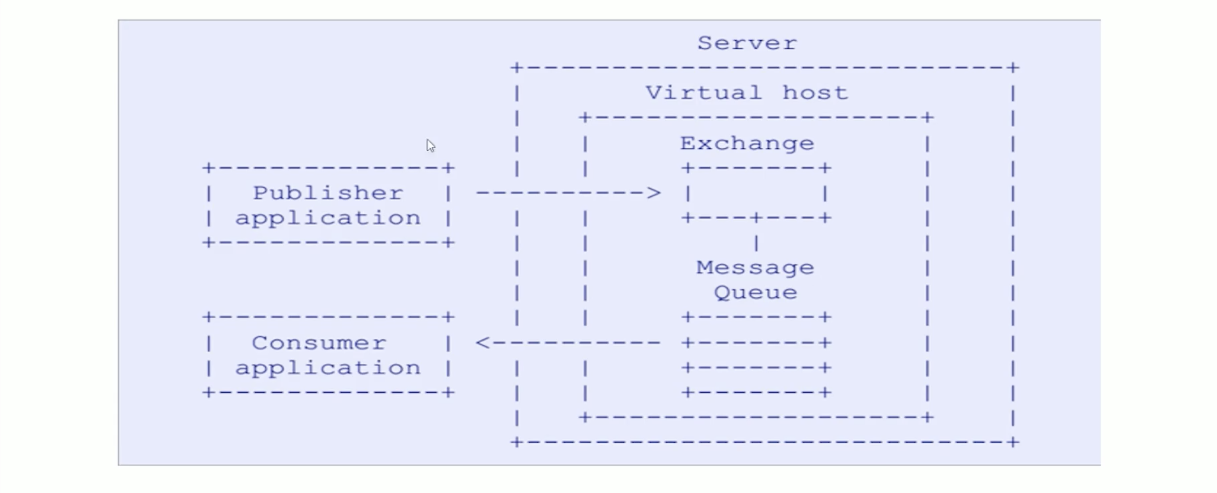
1 2 # AMQP 协议 AMQP(advanced message queuing protocol)`在2003年时被提出,最早用于解决金融领不同平台之间的消息传递交互问题。顾名思义,AMQP是一种协议,更准确的说是一种binary wire-level protocol(链接协议)。这是其和JMS的本质差别,AMQP不从API层进行限定,而是直接定义网络交换的数据格式。这使得实现了AMQP的provider天然性就是跨平台的。以下是AMQP协议模型:
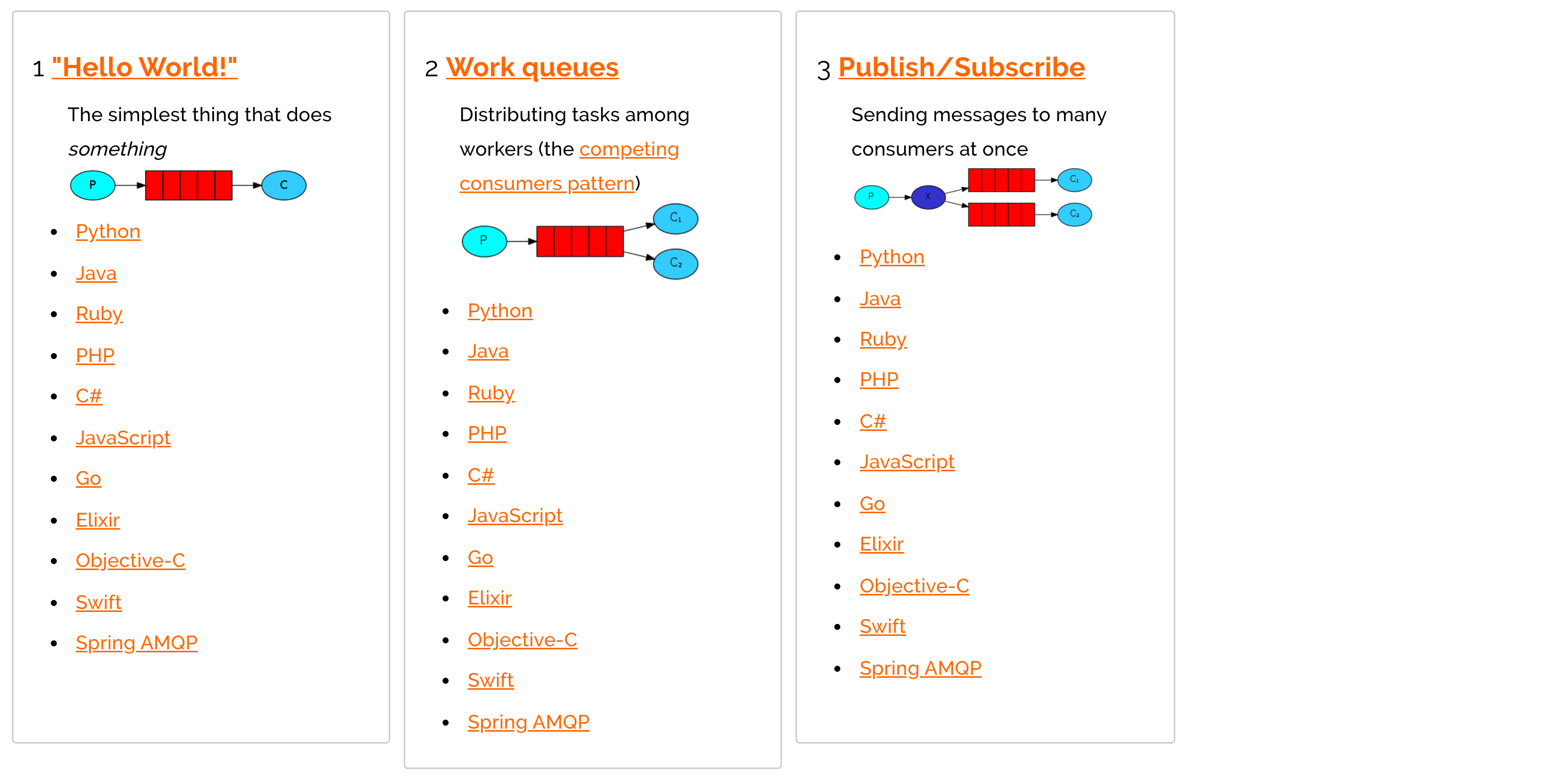
RabbitMQ支持的消息模型
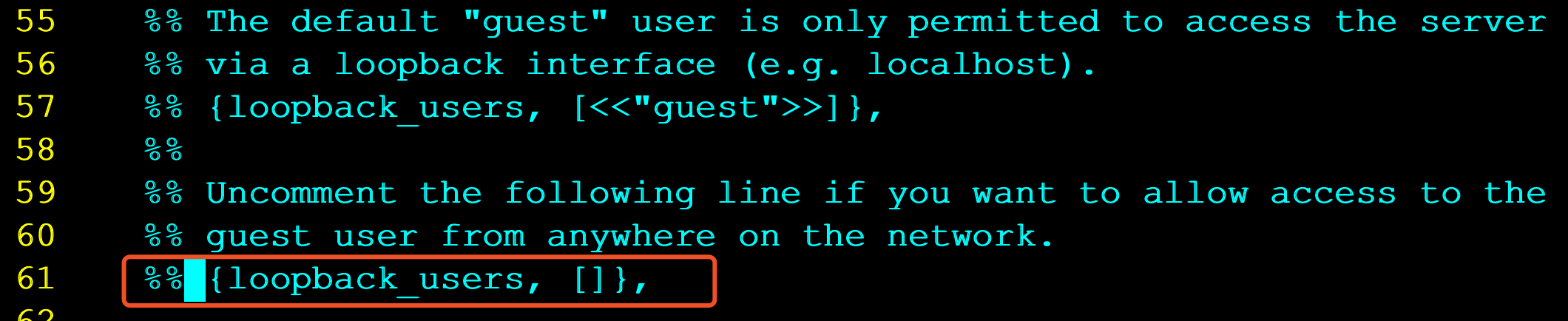
RabbitMQ配置 使用安装包安装 1 2 3 4 5 6 7 8 9 10 11 12 13 14 15 16 17 18 19 # 1.将rabbitmq安装包上传到linux系统中 erlang-22.0.7-1.el7.x86_64.rpm rabbitmq-server-3.7.18-1.el7.noarch.rpm # 2.安装Erlang依赖包 rpm -ivh erlang-22.0.7-1.el7.x86_64.rpm # 3.安装RabbitMQ安装包(需要联网) yum install -y rabbitmq-server-3.7.18-1.el7.noarch.rpm 注意:默认安装完成后配置文件模板在:/usr/share/doc/rabbitmq-server-3.7.18/rabbitmq.config.example目录中,需要 将配置文件复制到/etc/rabbitmq/目录中,并修改名称为rabbitmq.config # 4.复制配置文件 cp /usr/share/doc/rabbitmq-server-3.7.18/rabbitmq.config.example /etc/rabbitmq/rabbitmq.config # 5.查看配置文件位置 ls /etc/rabbitmq/rabbitmq.config # 6.修改配置文件(参见下图:) vim /etc/rabbitmq/rabbitmq.config
将上图中配置文件中红色部分去掉%%,以及最后的,逗号 修改为下图:
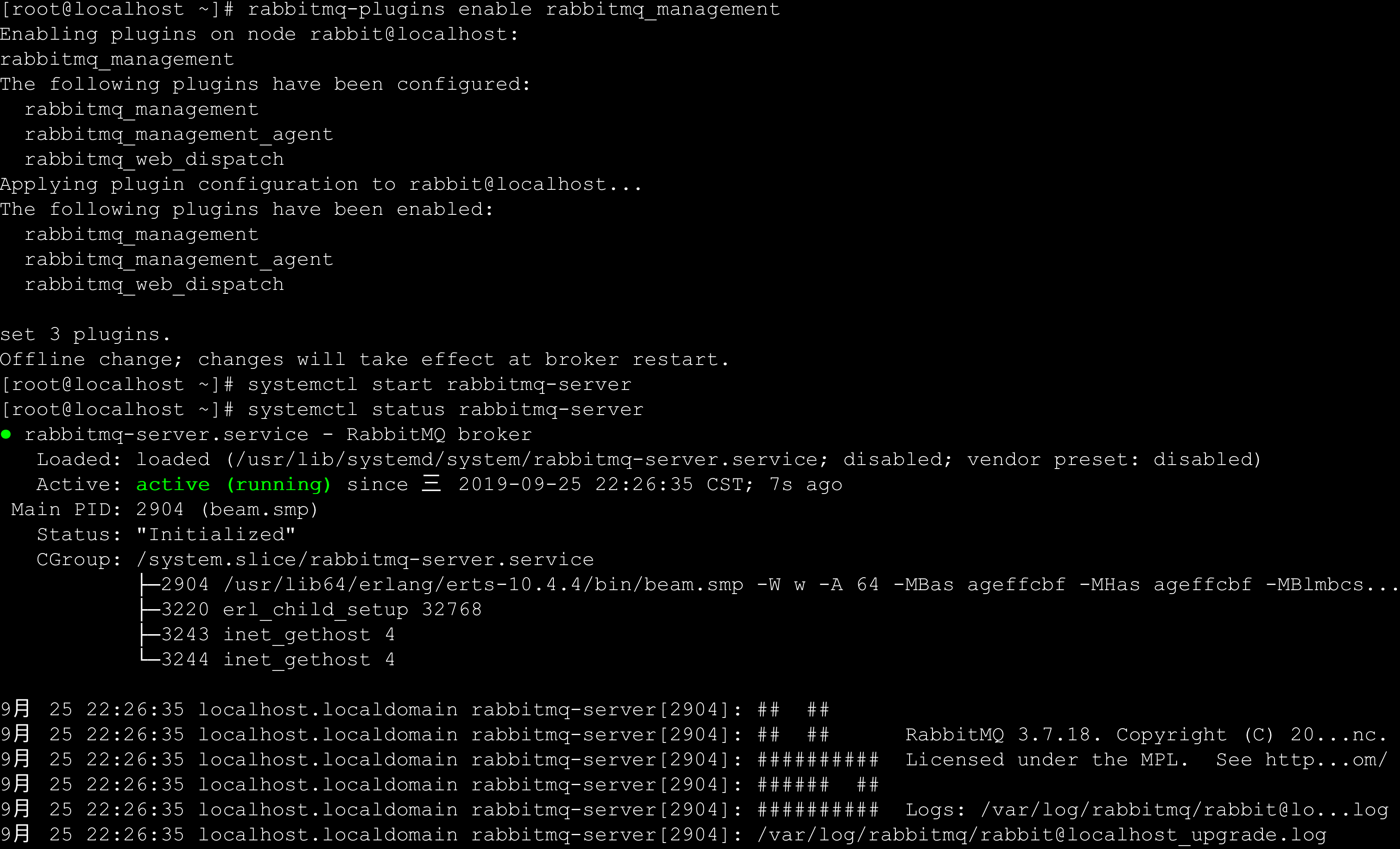
1 2 3 4 5 6 7 8 9 10 11 12 13 14 15 16 17 18 19 20 21 22 23 24 25 26 27 28 29 30 31 32 33 34 35 36 37 38 39 # 7.执行如下命令,启动rabbitmq中的插件管理 rabbitmq-plugins enable rabbitmq_management 出现如下说明: Enabling plugins on node rabbit@localhost: rabbitmq_management The following plugins have been configured: rabbitmq_management rabbitmq_management_agent rabbitmq_web_dispatch Applying plugin configuration to rabbit@localhost... The following plugins have been enabled: rabbitmq_management rabbitmq_management_agent rabbitmq_web_dispatch set 3 plugins. Offline change; changes will take effect at broker restart. # 8.启动RabbitMQ的服务 systemctl start rabbitmq-server systemctl restart rabbitmq-server systemctl stop rabbitmq-server # 9.查看服务状态(见下图:) systemctl status rabbitmq-server ● rabbitmq-server.service - RabbitMQ broker Loaded: loaded (/usr/lib/systemd/system/rabbitmq-server.service; disabled; vendor preset: disabled) Active: active (running) since 三 2019-09-25 22:26:35 CST; 7s ago Main PID: 2904 (beam.smp) Status: "Initialized" CGroup: /system.slice/rabbitmq-server.service ├─2904 /usr/lib64/erlang/erts-10.4.4/bin/beam.smp -W w -A 64 -MBas ageffcbf -MHas ageffcbf - MBlmbcs... ├─3220 erl_child_setup 32768 ├─3243 inet_gethost 4 └─3244 inet_gethost 4 .........
1 2 3 4 5 6 7 8 # 10.关闭防火墙服务 systemctl disable firewalld Removed symlink /etc/systemd/system/multi-user.target.wants/firewalld.service. Removed symlink /etc/systemd/system/dbus-org.fedoraproject.FirewallD1.service. systemctl stop firewalld # 11.访问web管理界面 http://10.15.0.8:15672/
使用Docker启动 1 docker run -d --hostname rabbit-host --name rabbitmq -e RABBITMQ_DEFAULT_USER=root -e RABBITMQ_DEFAULT_PASS=root -p 15672:15672 -p 5672:5672 rabbitmq:3-management
命令行管理 1 2 3 4 5 6 7 8 # 1.服务启动相关 systemctl start|restart|stop|status rabbitmq-server # 2.管理命令行 用来在不使用web管理界面情况下命令操作RabbitMQ rabbitmqctl help 可以查看更多命令 # 3.插件管理命令行 rabbitmq-plugins enable|list|disable
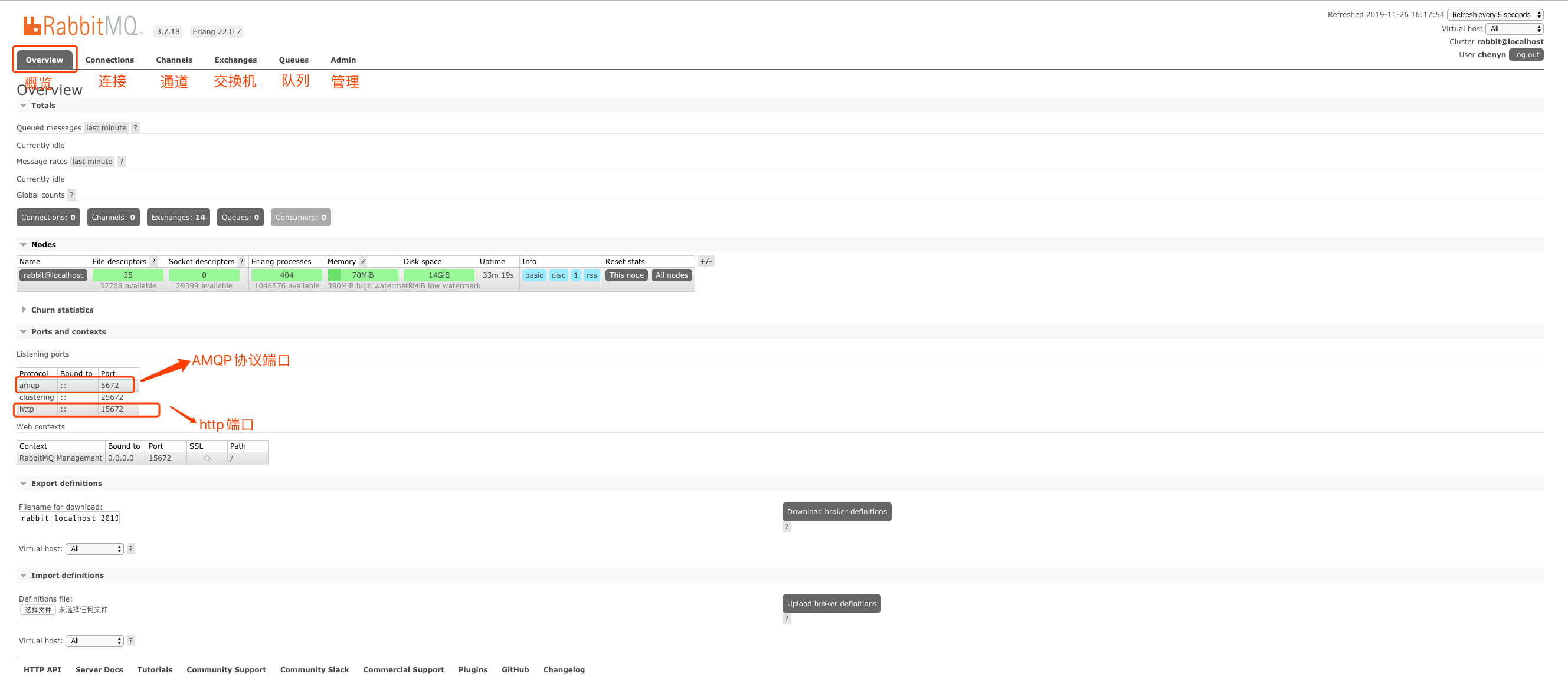
web界面介绍
connections:无论生产者还是消费者,都需要与RabbitMQ建立连接后才可以完成消息的生产和消费,在这里可以查看连接情况channels:通道,建立连接后,会形成通道,消息的投递获取依赖通道。Exchanges:交换机,用来实现消息的路由Queues:队列,即消息队列,消息存放在队列中,等待消费,消费后被移除队列。
创建虚拟主机 1 2 # 虚拟主机 为了让各个用户可以互不干扰的工作,RabbitMQ添加了虚拟主机(Virtual Hosts)的概念。其实就是一个独立的访问路径,不同用户使用不同路径,各自有自己的队列、交换机,互相不会影响。
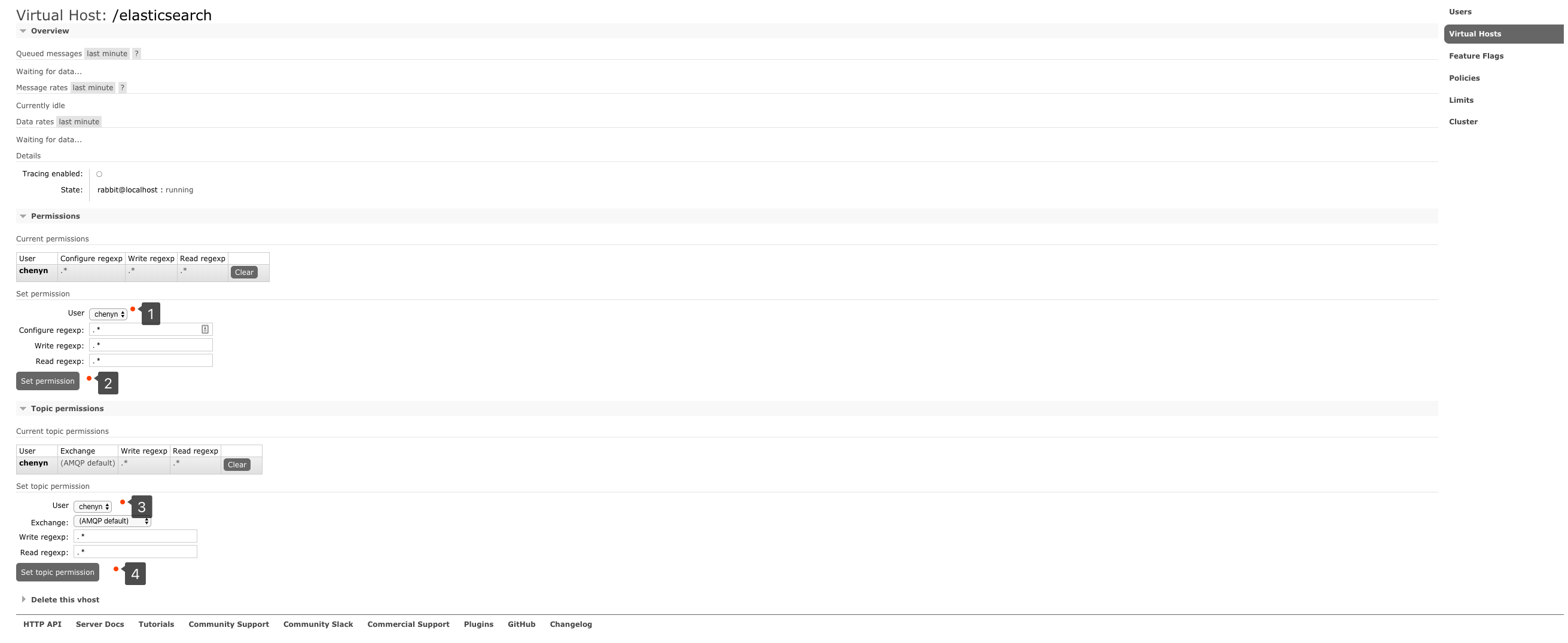
绑定虚拟主机和用户 创建好虚拟主机,我们还要给用户添加访问权限:
点击添加好的虚拟主机:
进入虚拟机设置界面:
HelloWord版本 引入依赖 1 2 3 4 5 <dependency > <groupId > com.rabbitmq</groupId > <artifactId > amqp-client</artifactId > <version > 5.9.0</version > </dependency >
第一种模型(直连) 
在上图的模型中,有以下概念:
P:生产者,也就是要发送消息的程序
C:消费者:消息的接受者,会一直等待消息到来。
queue:消息队列,图中红色部分。类似一个邮箱,可以缓存消息;生产者向其中投递消息,消费者从其中取出消息。
创建一个生产者 1 2 3 4 5 6 7 8 9 10 11 12 13 14 15 16 17 18 19 20 21 22 23 24 25 26 27 28 29 30 31 32 33 34 35 36 public class ProducerDemo @Test public void test () throws IOException, TimeoutException ConnectionFactory connectionFactory = new ConnectionFactory(); connectionFactory.setHost("121.196.147.102" ); connectionFactory.setPort(5672 ); connectionFactory.setUsername("root" ); connectionFactory.setPassword("root" ); connectionFactory.setVirtualHost("/zhang" ); Connection connection = connectionFactory.newConnection(); Channel channel = connection.createChannel(); channel.queueDeclare("hello" ,false ,false ,false ,null ); channel.basicPublish("" ,"hello" ,null ,"hello world" .getBytes()); channel.close(); connection.close(); } }
创建一个消费者 这里我们使用main方法来进行测试,因为如果我们使用junit进行测试的话,可能接收不到消息。(因为可能我们的测试线程退出之前我们并没有拿到队列中的消息)
1 2 3 4 5 6 7 8 9 10 11 12 13 14 15 16 17 18 19 20 21 22 23 24 25 26 27 28 29 30 31 32 33 34 35 36 37 38 39 40 41 42 43 public class ConsumerDemo public static void main (String[] args) throws IOException, TimeoutException ConnectionFactory connectionFactory = new ConnectionFactory(); connectionFactory.setHost("121.196.147.102" ); connectionFactory.setPort(5672 ); connectionFactory.setVirtualHost("/zhang" ); connectionFactory.setUsername("root" ); connectionFactory.setPassword("root" ); Connection connection = connectionFactory.newConnection(); Channel channel = connection.createChannel(); channel.queueDeclare("hello" ,false ,false ,false ,null ); channel.basicConsume("hello" ,true ,new DefaultConsumer(channel){ @Override public void handleDelivery (String consumerTag, Envelope envelope, AMQP.BasicProperties properties, byte [] body) throws IOException System.out.println(new String(body)); } }); } }
参数说明 1 channel.queueDeclare("aaa" ,true ,false ,false ,null );
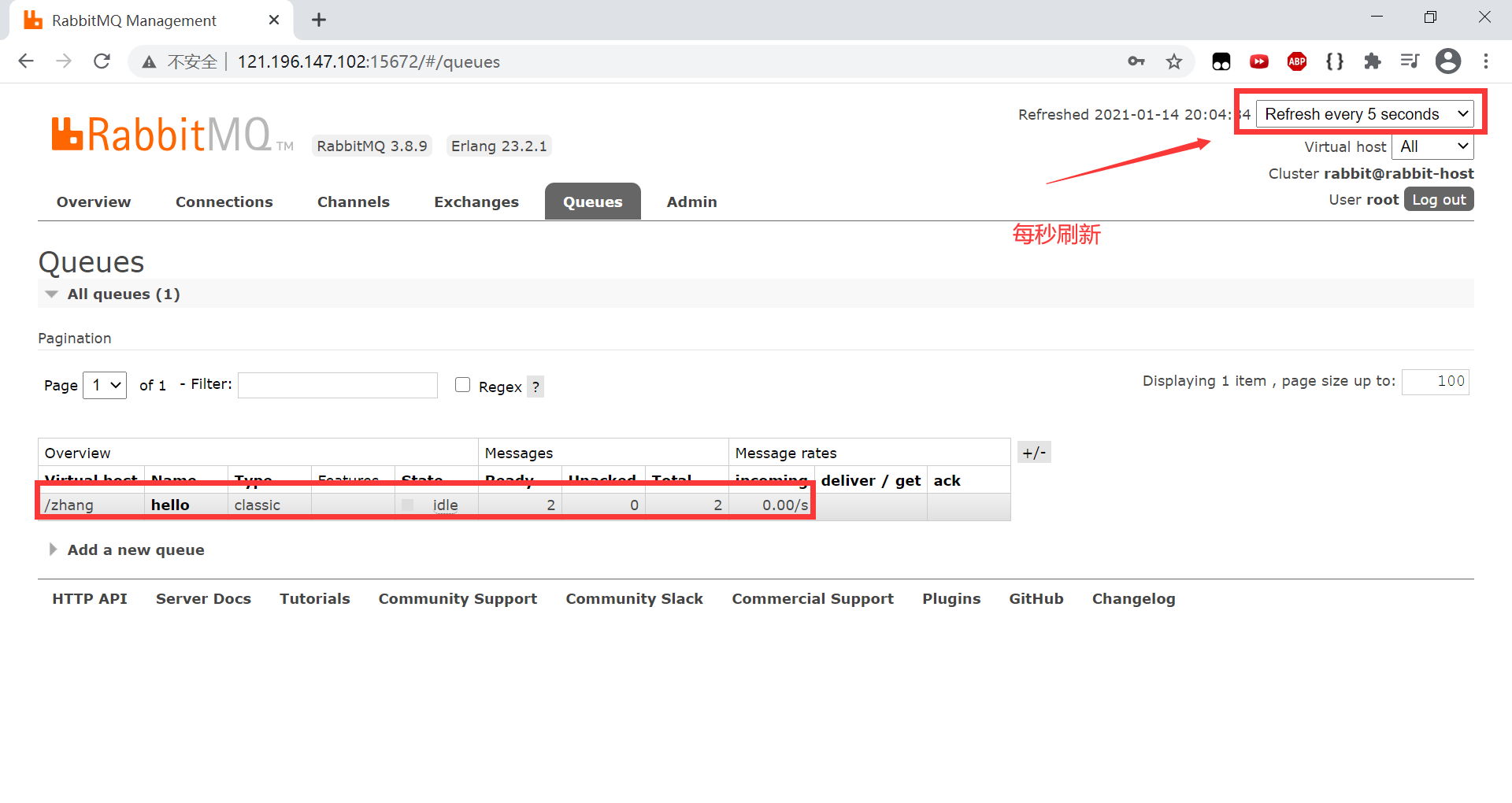
开启之后
重启rabbitmq服务 hello通道会丢失,而aaa通道不会丢失(但是消息会丢失)。
想让消息不丢失可以在channel.basicPublish("","aaa", MessageProperties.PERSISTENT_TEXT_PLAIN,"hello world".getBytes());添加MessageProperties.PERSISTENT_TEXT_PLAIN,这样rabbitmq在服务关闭时就会把消息特通道持久化到硬盘中,重启时会把消息和队列进行恢复。
如果设置为true, 队列只能被当前通道所绑定,不能被其他通道绑定。如果有其他通道绑定会抛出错误。
被消费完后,队列没有其他消息是否自动删除。
WorkQueue版本 Work queues,也被称为(Task queues),任务模型。当消息处理比较耗时的时候,可能生产消息的速度会远远大于消息的消费速度。长此以往,消息就会堆积越来越多,无法及时处理。此时就可以使用work 模型:让多个消费者绑定到一个队列,共同消费队列中的消息 。队列中的消息一旦消费,就会消失,因此任务是不会被重复执行的。
角色:
P:生产者:任务的发布者
C1:消费者-1,领取任务并且完成任务,假设完成速度较慢
C2:消费者-2:领取任务并完成任务,假设完成速度快
开发生产者 1 2 3 4 5 6 7 channel.queueDeclare("work" , true , false , false , null ); for (int i = 0 ; i < 10 ; i++) { channel.basicPublish("" ,"work" ,null ,"hello workqueue" .getBytes()); }
开发消费者(两个) 1 2 3 4 5 6 7 8 9 10 Channel channel = connection.createChannel(); channel.queueDeclare("work" ,true ,false ,false ,null ); channel.basicConsume("work" ,true ,new DefaultConsumer(channel) { @lombok .SneakyThrows @Override public void handleDelivery (String consumerTag, Envelope envelope, AMQP.BasicProperties properties, byte [] body) throws IOException System.out.println("消费者-1:" + new String(body)); Thread.sleep(1000 ); } });
测试结果
总结:RabbitMQ默认情况下,会轮询消息给每个消费者,每个消费者都会收到相同数量的消息。
但是这并不是我们想要的,我们需要处理快的消费者多处理消息。
消息自动确认
Doing a task can take a few seconds. You may wonder what happens if one of the consumers starts a long task and dies with it only partly done. With our current code, once RabbitMQ delivers a message to the consumer it immediately marks it for deletion. In this case, if you kill a worker we will lose the message it was just processing. We’ll also lose all the messages that were dispatched to this particular worker but were not yet handled.
But we don’t want to lose any tasks. If a worker dies, we’d like the task to be delivered to another worker.
1 2 3 4 5 6 7 8 9 channel.basicQos(1 ); channel.basicConsume("hello" ,false ,new DefaultConsumer(channel){ @Override public void handleDelivery (String consumerTag, Envelope envelope, AMQP.BasicProperties properties, byte [] body) throws IOException System.out.println("消费者1: " +new String(body)); channel.basicAck(envelope.getDeliveryTag(),false ); } });
设置通道一次只能消费一个消息
关闭消息的自动确认,开启手动确认消息
Fanout版本 fanout 扇出 也称为广播

在广播模式下,消息发送流程是这样的:
可以有多个消费者
每个消费者有自己的queue (队列)
每个队列都要绑定到Exchange (交换机)
生产者发送的消息,只能发送到交换机 ,交换机来决定要发给哪个队列,生产者无法决定。交换机把消息发送给绑定过的所有队列
队列的消费者都能拿到消息。实现一条消息被多个消费者消费
开发生产者 1 2 3 4 channel.exchangeDeclare("logs" ,"fanout" ); channel.basicPublish("logs" ,"" ,null ,"hello" .getBytes());
开发消费者-1 1 2 3 4 5 6 7 8 9 10 11 12 13 channel.exchangeDeclare("logs" ,"fanout" ); String queue = channel.queueDeclare().getQueue(); channel.queueBind(queue,"logs" ,"" ); channel.basicConsume(queue,true ,new DefaultConsumer(channel){ @Override public void handleDelivery (String consumerTag, Envelope envelope, AMQP.BasicProperties properties, byte [] body) throws IOException System.out.println("消费者1: " +new String(body)); } });
我们同时开发三个消费者。代码相同
测试结果
我们可以看到三个消费者都接收到了消息。
Routing版本
在Fanout模式中,一条消息,会被所有订阅者队列都消费。但是,在某些场景下,我们希望不同的消息被不同的队列所消费。这是我们就要用到Direct类型的交换机。
在Direct模型下:
队列与交换机的绑定,不能是任意绑定了,而是要指定一个RoutingKey(路由key)
消息的发送方在 向 Exchange发送消息时,也必须指定消息的 RoutingKey。
Exchange不再把消息交给每一个绑定的队列,而是根据消息的Routing Key进行判断,只有队列的Routingkey与消息的 Routing key完全一致,才会接收到消息
图解:
P:生产者,向Exchange发送消息,发送消息时,会指定一个routing key。
X:Exchange(交换机),接收生产者的消息,然后把消息递交给 与routing key完全匹配的队列
C1:消费者,其所在队列指定了需要routing key 为 error 的消息
C2:消费者,其所在队列指定了需要routing key 为 info、error、warning 的消息
1.开发生产者 1 2 3 4 5 channel.exchangeDeclare("logs_direct" ,"direct" ); String key = "" ; channel.basicPublish("logs_direct" ,key,null ,("指定的route key" +key+"的消息" ).getBytes());
2.开发消费者-1 1 2 3 4 5 6 7 8 9 10 11 12 13 14 15 16 channel.exchangeDeclare("logs_direct" ,"direct" ); String queue = channel.queueDeclare().getQueue(); channel.queueBind(queue,"logs_direct" ,"error" ); channel.queueBind(queue,"logs_direct" ,"info" ); channel.queueBind(queue,"logs_direct" ,"warn" ); channel.basicConsume(queue,true ,new DefaultConsumer(channel){ @Override public void handleDelivery (String consumerTag, Envelope envelope, AMQP.BasicProperties properties, byte [] body) throws IOException System.out.println("消费者1: " +new String(body)); } });
3.开发消费者-2 1 2 3 4 5 6 7 8 9 10 11 12 13 channel.exchangeDeclare("logs_direct" ,"direct" ); String queue = channel.queueDeclare().getQueue(); channel.queueBind(queue,"logs_direct" ,"error" ); channel.basicConsume(queue,true ,new DefaultConsumer(channel){ @Override public void handleDelivery (String consumerTag, Envelope envelope, AMQP.BasicProperties properties, byte [] body) throws IOException System.out.println("消费者2: " +new String(body)); } });
4.测试生产者发送Route key为error的消息时
5.测试生产者发送Route key为info的消息时
Topic版本 Topic类型的Exchange与Direct相比,都是可以根据RoutingKey把消息路由到不同的队列。只不过Topic类型Exchange可以让队列在绑定Routing key 的时候使用通配符!这种模型Routingkey 一般都是由一个或多个单词组成,多个单词之间以”.”分割,例如: item.insert
1 2 3 4 5 6 # 统配符 * (star) can substitute for exactly one word. 匹配不多不少恰好1个词 # (hash) can substitute for zero or more words. 匹配一个或多个词 # 如: audit.# 匹配audit.irs.corporate或者 audit.irs 等 audit.* 只能匹配 audit.irs
1.开发生产者 1 2 3 4 5 channel.exchangeDeclare("topics" ,"topic" ); String routekey = "user.save" ; channel.basicPublish("topics" ,routekey,null ,("这是路由中的动态订阅模型,route key: [" +routekey+"]" ).getBytes());
2.开发消费者-1 Routing Key中使用*通配符方式
1 2 3 4 5 6 7 8 9 10 11 12 13 14 channel.exchangeDeclare("topics" ,"topic" ); String queue = channel.queueDeclare().getQueue(); channel.queueBind(queue,"topics" ,"user.*" ); channel.basicConsume(queue,true ,new DefaultConsumer(channel){ @Override public void handleDelivery (String consumerTag, Envelope envelope, AMQP.BasicProperties properties, byte [] body) throws IOException System.out.println("消费者1: " +new String(body)); } });
3.开发消费者-2 Routing Key中使用#通配符方式
1 2 3 4 5 6 7 8 9 10 11 12 13 14 channel.exchangeDeclare("topics" ,"topic" ); String queue = channel.queueDeclare().getQueue(); channel.queueBind(queue,"topics" ,"user.#" ); channel.basicConsume(queue,true ,new DefaultConsumer(channel){ @Override public void handleDelivery (String consumerTag, Envelope envelope, AMQP.BasicProperties properties, byte [] body) throws IOException System.out.println("消费者2: " +new String(body)); } });
SpringBoot整合RabbitMQ HelloWorld 0.依赖 1 2 3 4 <dependency > <groupId > org.springframework.boot</groupId > <artifactId > spring-boot-starter-amqp</artifactId > </dependency >
1.编写配置文件 1 2 3 4 5 6 7 8 9 spring: application: name: rabbitmq-springboot rabbitmq: host: 121.196 .147 .102 port: 5672 username: root password: root virtual-host: /zhang
2.编写生产者 1 2 3 4 5 6 7 8 9 10 11 12 13 14 15 @SpringBootTest public class RabbitMQTest @Autowired private RabbitTemplate rabbitTemplate; @Test public void test () rabbitTemplate.convertAndSend("hello" ,"hello rabbitmq" ); } }
RabbitTemplate 用来简化操作 使用时候直接在项目中注入即可使用,使用convertAndSend方法直接发送消息。
3.编写消费者 1 2 3 4 5 6 7 8 9 10 11 12 13 14 @Component @RabbitListener (queuesToDeclare = @Queue (value = "hello" ,declare = "true" ))public class HelloCustomer @RabbitHandler public void receivel (String message) System.out.println("message=" + message); } }
@Queue注解可以指定队列的属性,默认持久化,非独占队列,不自动删除队列
WorkQueue 1.编写生产者 1 2 3 4 5 6 @Test public void testWork () for (int i = 0 ; i < 10 ; i++) { rabbitTemplate.convertAndSend("work" ,"hello rabbitmq - work" + i); } }
2.编写消费者 1 2 3 4 5 6 7 8 9 10 11 12 13 14 15 16 17 @Component public class WorkCustomer @RabbitListener (queuesToDeclare = @Queue (value = "work" )) public void receivel1 (String message) System.out.println("messgae1:" + message ); } @RabbitListener (queuesToDeclare = @Queue (value = "work" )) public void receivel2 (String message) System.out.println("message2:" + message); } }
说明:默认在Spring AMQP实现中Work这种方式就是公平调度,如果需要实现能者多劳需要额外配置
Fanout 1.开发生产者 1 2 3 4 5 @Test public void testFanout () rabbitTemplate.convertAndSend("logs" ,"" ,"hello rabbitmq - fanout" ); }
2.开发消费者 1 2 3 4 5 6 7 8 9 10 11 12 13 14 15 16 17 18 19 20 21 22 23 24 25 26 27 @Component public class FanoutCustomer @RabbitListener (bindings = { @QueueBinding ( value = @Queue , exchange = @Exchange (value = "logs" ,type = "fanout" ) ) }) public void receive1 (String message) System.out.println("message1 : " + message); } @RabbitListener (bindings = { @QueueBinding ( value = @Queue , exchange = @Exchange (value = "logs" ,type = "fanout" ) ) }) public void receive2 (String message) System.out.println("message2 : " + message); } }
Route 1.开发生产者 1 2 3 4 5 @Test public void testRoute () rabbitTemplate.convertAndSend("directs" ,"info" ,"hello rabbitmq - direct" ); }
2.开发消费者 1 2 3 4 5 6 7 8 9 10 11 12 13 14 15 16 17 18 19 20 21 22 23 24 25 26 27 28 29 @Component public class RouteCustomer @RabbitListener (bindings = { @QueueBinding ( value = @Queue , exchange = @Exchange (value = "directs" ,type = "direct" ), key = {"error" ,"info" ,"warning" } ) }) public void receive1 (String message) System.out.println("message1 : " + message); } @RabbitListener (bindings = { @QueueBinding ( value = @Queue , exchange = @Exchange (value = "directs" ,type = "direct" ), key = {"error" } ) }) public void receive2 (String message) System.out.println("message2 :" + message); } }
Topic 动态路由
1.开发生产者 1 2 3 4 5 6 @Test public void testTopic () String routeKey = "product.save" ; rabbitTemplate.convertAndSend("topics" ,routeKey,"要执行的业务是 : " + routeKey); }
2.开发消费者 1 2 3 4 5 6 7 8 9 10 11 12 13 14 15 16 17 18 19 20 21 22 23 24 25 26 27 28 29 30 @Component public class TopicCustomer @RabbitListener (bindings = { @QueueBinding ( value = @Queue , exchange = @Exchange (value = "topics" ,type = "topic" ), key = {"user.#" } ) }) public void receive1 (String message) System.out.println("message1 :" + message); } @RabbitListener (bindings = { @QueueBinding ( value = @Queue , exchange = @Exchange (value = "topics" ,type = "topic" ), key = {"product.*" ,"user.*" } ) }) public void receive2 (String message) System.out.println("message2 :" + message); } }
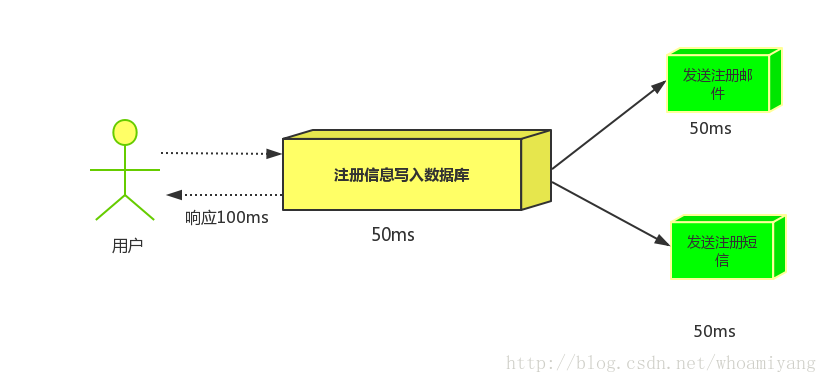
RabbitMQ的使用场景 异步处理 场景说明:用户注册后,需要发注册邮件和注册短信,传统的做法有两种 1.串行的方式 2.并行的方式
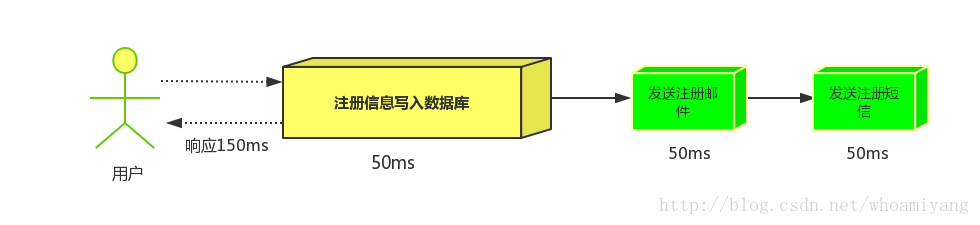
串行方式: 将注册信息写入数据库后,发送注册邮件,再发送注册短信,以上三个任务全部完成后才返回给客户端。 这有一个问题是,邮件,短信并不是必须的,它只是一个通知,而这种做法让客户端等待没有必要等待的东西.
并行方式:将注册信息写入数据库后,发送邮件的同时,发送短信,以上三个任务完成后,返回给客户端,并行的方式能提高处理的时间。
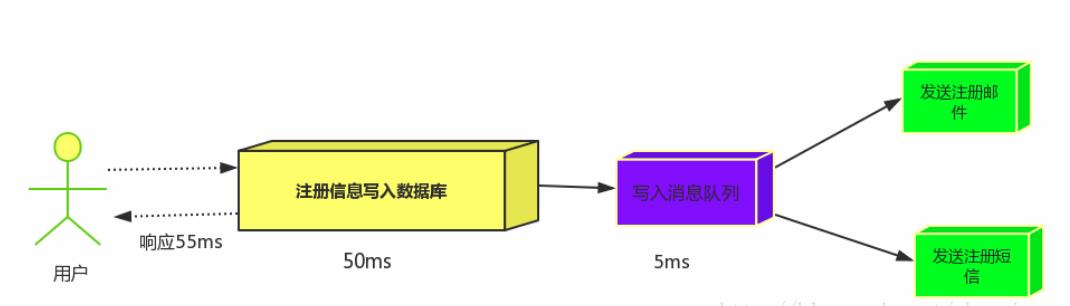
消息队列:假设三个业务节点分别使用50ms,串行方式使用时间150ms,并行使用时间100ms。虽然并行已经提高的处理时间,但是,前面说过,邮件和短信对我正常的使用网站没有任何影响,客户端没有必要等着其发送完成才显示注册成功,应该是写入数据库后就返回. 消息队列: 引入消息队列后,把发送邮件,短信不是必须的业务逻辑异步处理
由此可以看出,引入消息队列后,用户的响应时间就等于写入数据库的时间+写入消息队列的时间(可以忽略不计),引入消息队列后处理后,响应时间是串行的3倍,是并行的2倍。
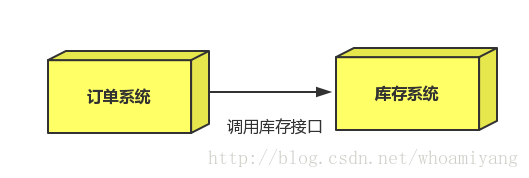
应用解耦 场景:双11是购物狂节,用户下单后,订单系统需要通知库存系统,传统的做法就是订单系统调用库存系统的接口.
这种做法有一个缺点:
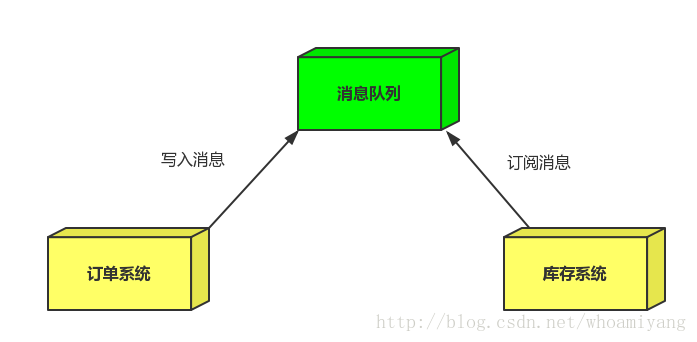
当库存系统出现故障时,订单就会失败。 订单系统和库存系统高耦合. 引入消息队列
订单系统:用户下单后,订单系统完成持久化处理,将消息写入消息队列,返回用户订单下单成功。
库存系统:订阅下单的消息,获取下单消息,进行库操作。 就算库存系统出现故障,消息队列也能保证消息的可靠投递,不会导致消息丢失.
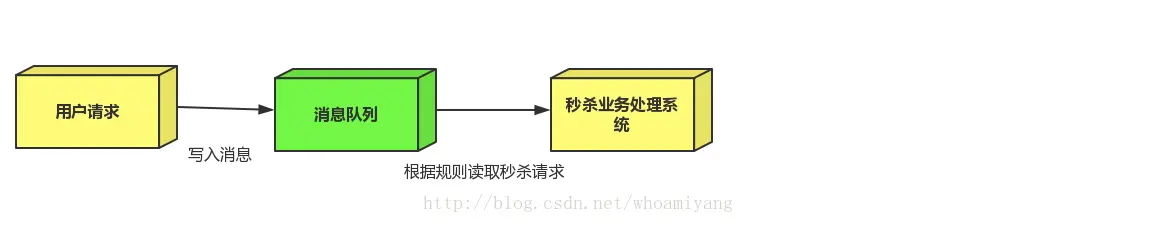
流量削峰 场景: 秒杀活动,一般会因为流量过大,导致应用挂掉,为了解决这个问题,一般在应用前端加入消息队列。
作用:
1.可以控制活动人数,超过此一定阀值的订单直接丢弃(我为什么秒杀一次都没有成功过呢^^)
2.可以缓解短时间的高流量压垮应用(应用程序按自己的最大处理能力获取订单)
1.用户的请求,服务器收到之后,首先写入消息队列,加入消息队列长度超过最大值,则直接抛弃用户请求或跳转到错误页面.
2.秒杀业务根据消息队列中的请求信息,再做后续处理.