Mybatis再学习
Mybatis工具类(线程安全版本) 1 2 3 4 5 6 7 8 9 10 11 12 13 14 15 16 17 18 19 20 21 22 23 24 25 26 27 28 29 30 31 32 33 34 35 36 37 38 39 40 41 42 43 44 45 46 47 48 49 50 51 52 53 54 55 56 57 58 59 60 61 62 63 64 65 66 67 68 69 70 71 package com.gem.util;import org.apache.ibatis.io.Resources;import org.apache.ibatis.session.SqlSession;import org.apache.ibatis.session.SqlSessionFactory;import org.apache.ibatis.session.SqlSessionFactoryBuilder;import java.io.Reader;public class MybatisUtil private static SqlSessionFactory sqlSessionFactory = null ; private static ThreadLocal<SqlSession> threadLocal = new ThreadLocal(); static { try { Reader reader = Resources.getResourceAsReader("sqlMapConfig.xml" ); sqlSessionFactory = new SqlSessionFactoryBuilder().build(reader); }catch (Exception e){ e.printStackTrace(); } } public static SqlSessionFactory getSqlSessionFactory () return sqlSessionFactory; } private static void newSqlSession () SqlSession sqlSession = sqlSessionFactory.openSession(true ); threadLocal.set(sqlSession); } public static SqlSession getSqlSession () SqlSession sqlSession = threadLocal.get(); if (sqlSession ==null ){ newSqlSession(); sqlSession = threadLocal.get(); } return sqlSession; } public static void closeSqlSession () SqlSession sqlSession = threadLocal.get(); if (sqlSession != null ){ sqlSession.close(); threadLocal.set(null ); } } }
配置别名 给整个包下的所有类配置别名,默认首字符大小写都可以
1 2 3 4 <typeAliases > <package name ="com.gem.entity" /> </typeAliases >
配置类型处理器 实体类存在枚举类型
1 2 3 4 5 6 7 8 9 10 11 12 13 @Data @AllArgsConstructor @NoArgsConstructor public class Student private Integer id; private String name; private LocalDate birthday; private Gender gender; }
1 2 3 4 5 6 7 public enum Gender { MALE,FEMALE; }
数据库存的是枚举的下标0,1 ,直接查询会报错
这是因为mybatis提供了两种枚举处理器,默认情况下是EnumTypeHandler(字符串),我们需要修改默认的枚举处理器,使用下标来实现
1 2 3 4 <typeHandlers > <typeHandler handler ="org.apache.ibatis.type.EnumOrdinalTypeHandler" javaType ="com.gem.entity.Gender" > </typeHandler > </typeHandlers >
引入外部配置文件 我们可以使用properties标签来引入外部文件,将数据库的配置文件分离开来。
1 2 <properties resource ="db.properties" />
使用log4j实现日志功能 导入log4j依赖
1 2 3 4 5 <dependency > <groupId > log4j</groupId > <artifactId > log4j</artifactId > <version > 1.2.17</version > </dependency >
导入log4j配置文件
1 2 3 4 5 6 7 8 log4j.rootLogger =WARN, stdout log4j.appender.stdout =org.apache.log4j.ConsoleAppender log4j.appender.stdout.layout =org.apache.log4j.PatternLayout log4j.appender.stdout.layout.ConversionPattern =%5p [%t] - %m%n log4j.logger.com.gem.mapper =DEBUG
使用p6spy探测sql语句 上面我们可以看出使用Log4j输出的日志信息并没有完整的sql语句,想要查看完整的sql语句 ,我们需要使用第三方工具p6spy
导入依赖
1 2 3 4 5 <dependency > <groupId > p6spy</groupId > <artifactId > p6spy</artifactId > <version > 3.9.1</version > </dependency >
替换mysql驱动
1 2 3 <property name ="driver" value ="com.p6spy.engine.spy.P6SpyDriver" />
修改url
1 2 <property name ="url" value ="jdbc:p6spy:mysql:///study?serverTimezone=GMT%2B8" />
P6Spy是一个可以用来在应用程序中拦截和修改数据操作语句的开源框架。 通过P6Spy我们可以对SQL语句进行拦截,相当于一个SQL语句的记录器,这样我们可以用它来作相关的分析,比如性能分析。
P6SPY提供了如下几个功能:
#{} 和 ${}
需求:通过姓名模糊查询
1 List<Student> selectStudentsByName (String name) ;
两种实现方式
1 2 3 <select id ="selectStudentsByName" resultType ="com.gem.entity.Student" > select * from mybatis_student where name like concat('%',#{name},'%'); </select >
1 2 3 <select id ="selectStudentsByName" resultType ="com.gem.entity.Student" > select * from mybatis_student where name like '%$(name)%'; </select >
虽然两种方法都可以实现,但是${}是不可取的
#{}是预编译处理,$ {}是字符串替换。使用 #{} 可以有效的防止SQL注入,提高系统安全性。
当然在在某些特殊的场合下只能使用${},不能用#{}。例如:在使用排序时ORDER BY ${id},如果使用#{id},则会被解析成ORDER BY “id”,这显然是一种错误的写法。
动态SQL 通过mybatis提供的各种标签方法实现动态拼接sql。
if 需求:更新用户信息
1 int updateStudent (Student student)
正常写法
1 2 3 4 <update id ="updateStudent" > update mybatis_student set name = #{name},birthday = #{birthday},gender = #{gender} where id = #{id} </update >
如果我们不想修改name属性并没有设置name属性,这时候就会把数据库更新为null,这就不符合要求了。这时候就需要使用if标签进行判断了
1 2 3 4 5 6 7 8 9 10 11 12 13 14 15 16 17 <update id ="updateStudent" > update mybatis_student set id=#{id} <if test ="name !=null and name!=''" > ,name=#{name} </if > <if test ="birthday !=null and birthday!=''" > ,birthday=#{birthday} </if > <if test ="gender !=null and gender!=''" > ,gender=#{gender} </if > <where > id=#{id} </where > </update >
where 需求:按多个要求查找
1 List<Student> selectStudentsByConditions (@Param("name" ) String name, @Param ("gender" ) Gender gender) ;
这个正常实现
1 2 3 4 5 6 7 8 9 10 <select id ="selectStudentsByConditions" resultType ="com.gem.entity.Student" > select * from mybatis_student where <if test ="name != null and name != ''" > and name like concat('%',#{name},'%') </if > <if test ="gender != null" > and gender = #{gender} </if > </select >
传入两个参数没有问题,但是如果我们只传入最后一个参数就会解析有问题,多出一个and这时候就需要使用where标签
1 2 3 4 5 6 7 8 9 10 11 12 <select id ="selectStudentsByConditions" resultType ="com.gem.entity.Student" > select * from mybatis_student <where > <if test ="name != null and name != ''" > and name like concat('%',#{name},'%') </if > <if test ="gender != null" > and gender = #{gender} </if > </where > </select >
where标签会自动帮我们去除第一个and,保证sql语句的正确解析。
foreach 向sql传递数组或者list,mybatis使用foreach解析
需求:传入一个list,查找id在其中的student
1 List<Student> selectStudentsByIds (@Param("ids" ) List<Long> ids) ;
1 2 3 4 5 6 7 8 9 10 <select id ="selectStudentsByIds" resultType ="Student" > select * from mybatis_student <where > <if test ="ids != null and ids.size > 0" > <foreach collection ="ids" open ="id in (" close =")" item ="id" separator ="," > #{id} </foreach > </if > </where > </select >
collection 表示迭代的集合或者数组
open 表示迭代开始的内容
close 表示迭代结束的内容
item 表示迭代的每一个项
separator 表示迭代间隔符
SQL片段 Sql中可将重复的sql提取出来,使用时用include引用即可,最终达到sql重用的目的,如下:
原本sql
1 2 3 4 5 6 7 8 9 10 11 12 <select id ="selectStudentsByConditions" resultType ="com.gem.entity.Student" > select * from mybatis_student <where > <if test ="name != null and name != ''" > and name like concat('%',#{name},'%') </if > <if test ="gender != null" > and gender = #{gender} </if > </where > </select >
我们可以将where条件抽取成sql片段
1 2 3 4 5 6 7 8 9 10 11 <sql id ="query_student_condition" > <where > <if test ="name!=null and name!=''" > and name=concat('%',#{name},'%') </if > <if test ="gender!=null" > and gender=#{gender} </if > </where > </sql >
使用include引入
1 2 3 4 5 6 7 <select id ="selectStudentsByConditions" resultType ="Student" > select * from mybatis_student <include refid ="query_student_condition" > </include > </select >
关联查询 一对一 husband和wife实体
1
2
3
4
5
6
7
@Data public class Husband private Integer id; private String name; private Wife wife; }
1
2
3
4
5
@Data public class Wife private Integer id; private String name; }
需求:级联查询,如果通过姓名查询丈夫,如果丈夫有妻子则一起查出
1 Husband selectHusbandByName (String name) ;
实现
1 2 3 4 5 6 7 8 9 10 11 12 13 <resultMap id ="husbandAndWife" type ="Husband" > <id property ="id" column ="id" > </id > <result property ="name" column ="name" > </result > <association property ="wife" javaType ="Wife" > <id property ="id" column ="wid" /> <result property ="name" column ="wname" /> </association > </resultMap > <select id ="selectHusbandByName" resultMap ="husbandAndWife" > select h.id,h.name,w.id wid,w.name wname from mybatis_husband h left join mybatis_wife w on h.wife_id = w.id where h.name = #{name} </select >
一对一使用association标签,property表示实体类字段,column表述数据库字段,使用javaType属性
一对多 顾客和订单实体
1
2
3
4
5
6
7
@Data public class Customer private Long id; private String name; private List<Order> orders; }
1
2
3
4
5
6
@Data public class Order private Long id; private String orderno; private Double price; }
需求:根据客户名查询客户,如果该客户有订单,则级联查询该客户的订单信息
1 Customer selectCustomerAndOrders (String name) ;
实现
1 2 3 4 5 6 7 8 9 10 11 12 13 14 15 16 17 18 19 <mapper namespace ="com.gem.mapper.CustomerMapper" > <resultMap id ="customerAndOrdersMap" type ="Customer" > <id property ="id" column ="id" /> <result property ="name" column ="name" /> <collection property ="orders" ofType ="Order" > <id property ="id" column ="oid" /> <result property ="orderno" column ="orderno" /> <result property ="price" column ="price" /> </collection > </resultMap > <select id ="selectCustomerAndOrders" resultMap ="customerAndOrdersMap" > select c.id, c.name, o.id oid, o.orderno, o.price from hbm_customer c left join hbm_order o on o.customer_id = c.id where c.name = #{name} </select >
一对多使用collection标签,使用ofType表示多端类型
多对多 用户和角色实体
1
2
3
4
5
6
7
8
@Data public class User private Long id; private String username; private String password; private List<Role> roles; }
1
2
3
4
5
6
7
@Data public class Role private Long id; private String roleName; private List<User> users; }
需求:根据姓名查询用户信息,并且级联查询出用户的角色
1 User selectUserAndRoles (String name) ;
实现
1 2 3 4 5 6 7 8 9 10 11 12 13 14 15 16 17 18 <mapper namespace ="com.gem.mapper.UserMapper" > <resultMap id ="userAndRolesMap" type ="User" > <id property ="id" column ="id" /> <result property ="username" column ="username" /> <result property ="password" column ="password" /> <collection property ="roles" ofType ="Role" > <id property ="id" column ="rid" /> <result property ="roleName" column ="roleName" /> </collection > </resultMap > <select id ="selectUserAndRoles" resultMap ="userAndRolesMap" > select u.id, u.username, u.password, r.id rid, r.roleName from mybatis_user u join mybatis_ur ur on ur.user_id = u.id join mybatis_role r on ur.role_id = r.id where u.username = #{username} </select >
需要关联一张中间表,多对多和一对多一致。
获取自增id的值 实体对应上面的客户表
1 int insertCustomer (Customer customer)
1 2 3 <insert id ="insertCustomer" useGeneratedKeys ="true" keyProperty ="id" > insert into hbm_customer(name) value (#{name}) </insert >
useGeneratedKeys属性设置为true,keyProperty设置为id
测试类
1
2
3
4
5
6
7
@Test public void insertCustomer () Customer customer = new Customer(); customer.setName("张三" ); mapper.insertCustomer(customer); System.out.println("id为---->" + customer.getId()); }
输出结果
我们还可以通过<selectKey>实现
1 2 3 4 5 6 <insert id ="insertCustomer" parameterType ="Customer" useGeneratedKeys ="true" keyProperty ="id" > <selectKey keyProperty ="id" resultType ="int" order ="AFTER" > select last_insert_id(); </selectKey > insert into hbm_customer(name) value (#{name}) </insert >
延迟加载 打开延迟加载开关
设置项
描述
允许值
默认值
lazyLoadingEnabled
全局性设置懒加载。如果设为‘false’,则所有相关联的都会被初始化加载。
true | false
false
aggressiveLazyLoading
当设置为‘true’的时候,懒加载的对象可能被任何懒属性全部加载。否则,每个属性都按需加载。
true | false
true
在mybatis核心配置文件中配置:
1 2 3 4 5 6 7 <settings > <setting name ="lazyLoadingEnabled" value ="true" /> <setting name ="aggressiveLazyLoading" value ="false" /> </settings >
实现
需求:根据姓名查询丈夫信息,如果该丈夫有妻子,则延迟加载妻子的信息
Mapper接口中的两个方法
1
2
3
Husband selectHusbandAndWifeLazy (String name) ;Wife selectWifeById (Long id) ;
xml的实现
1 2 3 4 5 6 7 8 9 10 11 12 13 14 15 16 <resultMap id ="lazyHusbandAndWife" type ="Husband" > <id property ="id" column ="id" /> <result property ="name" column ="name" /> <association property ="wife" javaType ="Wife" select ="selectWifeById" column ="id" > </association > </resultMap > <select id ="selectHusbandAndWifeLazy" resultMap ="lazyHusbandAndWife" > select * from mybatis_husband where name = #{name}; </select > <select id ="selectWifeById" resultType ="com.gem.entity.Wife" > select * from mybatis_wife where husband_id = #{id} </select >
于正常级联查询不同,将原本一个sql分为两个单独sql,但是不同的是查询丈夫的时候,并没有返回丈夫的实体,而是返回了一个resultMap,association标签也并没有去绑定实体,而是去引用另一个sql,association本身提供懒加载功能
测试
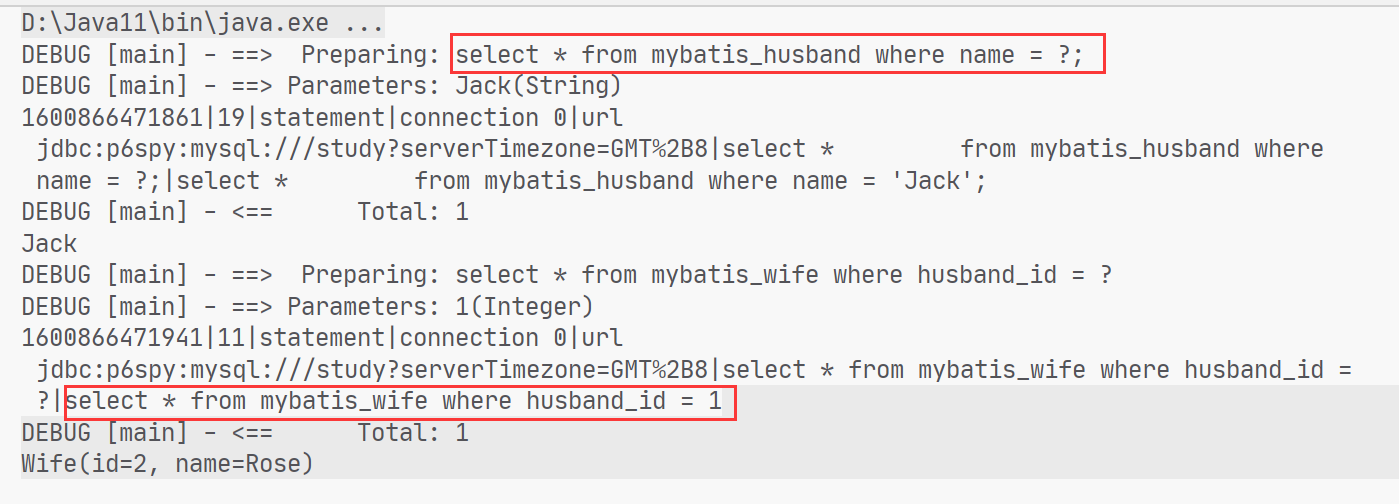
我们只打印丈夫的name
1 System.out.println(husband.getName());
sql语句并没有执行查询妻子的部分
尝试输出妻子的信息
1 System.out.println(husband.getWife());
两句sql都有执行
小结
当需要查询关联信息时再去数据库查询,默认不去关联查询,提高数据库性能。
只有使用resultMap支持延迟加载设置。
场合:
当只有部分记录需要关联查询其它信息时,此时可按需延迟加载,需要关联查询时再向数据库发出sql,以提高数据库性能。
当全部需要关联查询信息时,此时不用延迟加载,直接将关联查询信息全部返回即可,可使用resultType或resultMap完成映射。
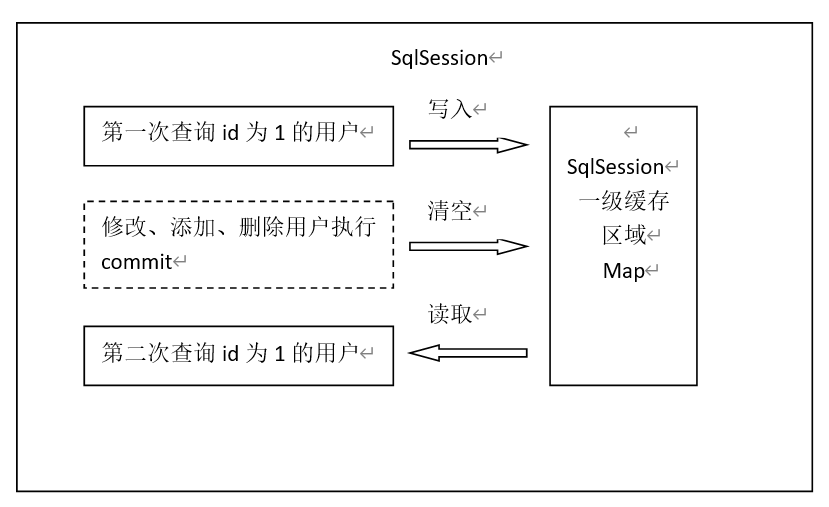
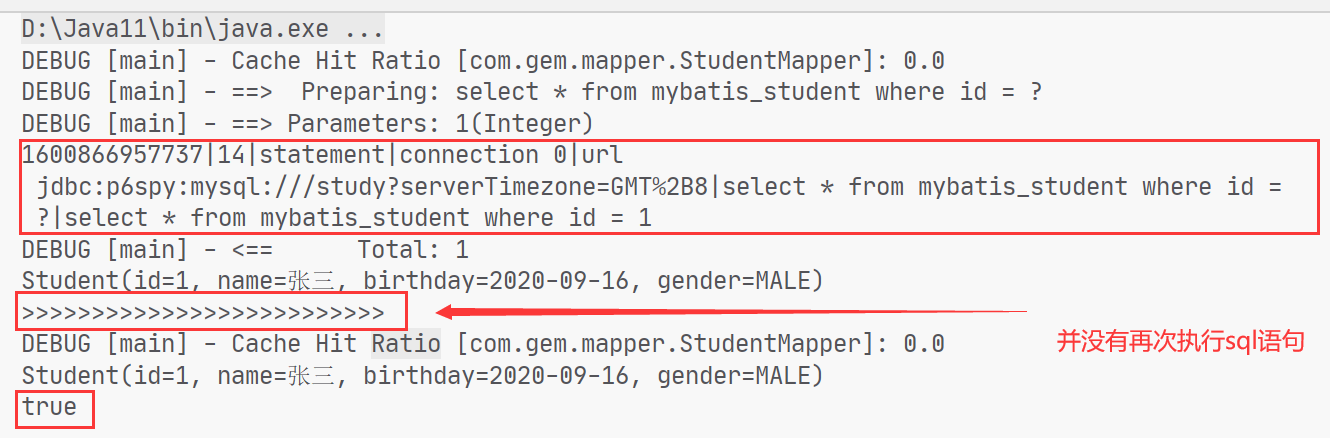
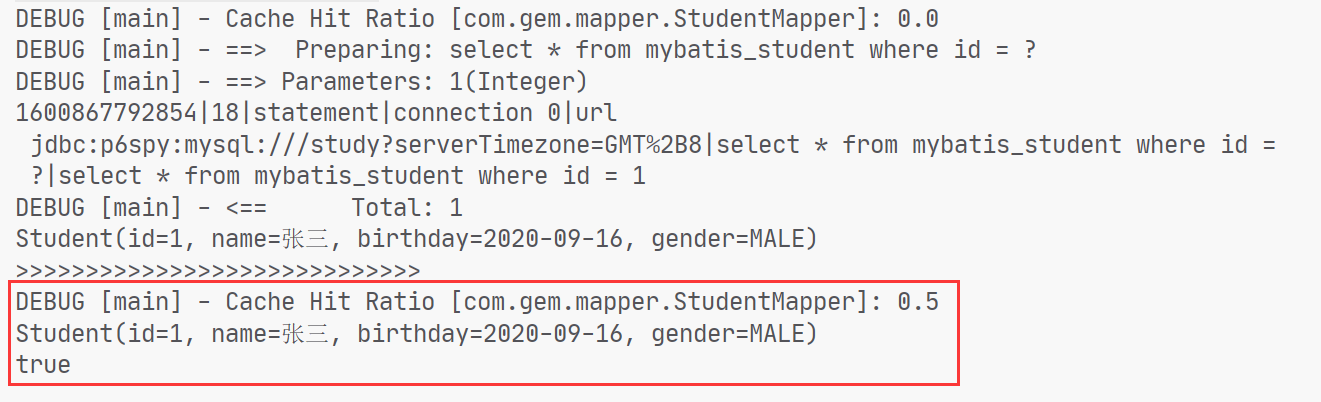
查询缓存 Mybatis一级缓存的作用域是同一个SqlSession,在同一个sqlSession中两次执行相同的sql语句,第一次执行完毕会将数据库中查询的数据写到缓存(内存),第二次会从缓存中获取数据将不再从数据库查询,从而提高查询效率。当一个sqlSession结束后该sqlSession中的一级缓存也就不存在了。Mybatis默认开启一级缓存。
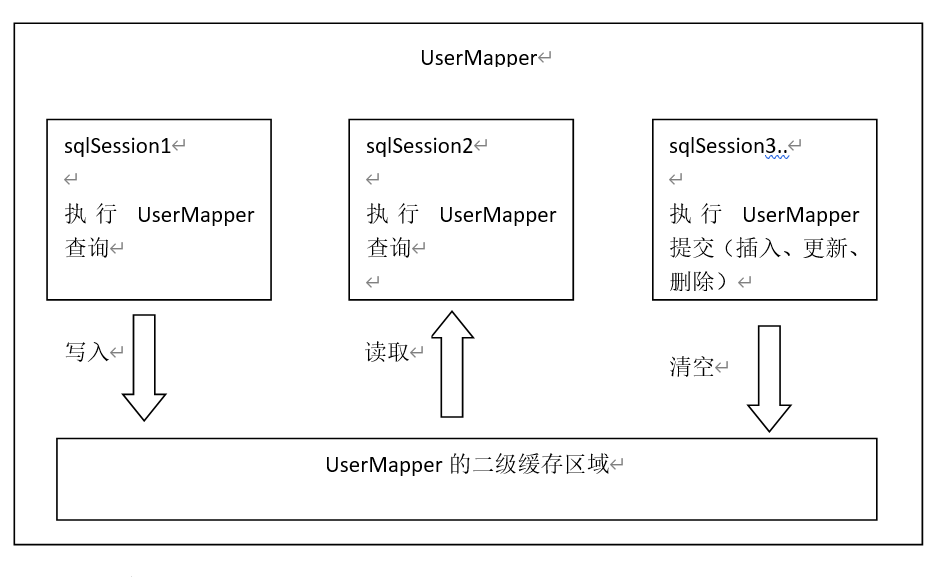
Mybatis二级缓存是多个SqlSession共享的,其作用域是mapper的同一个namespace,不同的sqlSession两次执行相同namespace下的sql语句且向sql中传递参数也相同即最终执行相同的sql语句,第一次执行完毕会将数据库中查询的数据写到缓存(内存),第二次会从缓存中获取数据将不再从数据库查询,从而提高查询效率。Mybatis默认没有开启二级缓存需要在setting全局参数中配置开启二级缓存
一级缓存
测试
1 2 3 4 5 6 7 8 9 10 11 12 13 14 @Test public void testFirstLevelCache () SqlSession sqlSession = MybatisUtil.getSqlSession(); StudentMapper mapper = sqlSession.getMapper(StudentMapper.class ) ; Student s1 = mapper.selectStudentById(1 ); System.out.println(s1); System.out.println(">>>>>>>>>>>>>>>>>>>>>>>>>>" ); Student s2 = mapper.selectStudentById(1 ); System.out.println(s2); System.out.println(s1 == s2); }
二级缓存
二级缓存区域是根据mapper的namespace划分的,相同namespace的mapper查询数据放在同一个区域,如果使用mapper代理方法每个mapper的namespace都不同,此时可以理解为二级缓存区域是根据mapper划分。
每次查询会先从缓存区域找,如果找不到从数据库查询,查询到数据将数据写入缓存。
Mybatis内部存储缓存使用一个HashMap,key为hashCode+sqlId+Sql语句。value为从查询出来映射生成的java对象
sqlSession执行insert、update、delete等操作commit提交后会清空缓存区域。
开启二级缓存
描述
允许值
默认值
cacheEnabled
对在此配置文件下的所有cache 进行全局性开/关设置。
true false
true
在核心配置文件SqlMapConfig.xml中加入
1 2 3 4 <settings > <setting name ="cacheEnabled" value ="true" /> </settings >
要在你的Mapper映射文件中添加一行:<cache /> ,表示此mapper开启二级缓存
二级缓存需要查询结果映射的实体对象实现java.io.Serializable接口实现序列化和反序列化操作,注意如果存在父类、成员pojo都需要实现序列化接口。
测试就可以实现了
使用ehcache实现二级缓存
1 2 3 4 5 6 <dependency > <groupId > org.mybatis.caches</groupId > <artifactId > mybatis-ehcache</artifactId > <version > 1.2.1</version > <scope > compile</scope > </dependency >
1 2 3 4 5 6 7 8 9 10 11 12 13 14 15 16 17 18 19 20 21 22 23 24 25 26 27 28 29 30 31 32 <ehcache > <diskStore path ="D:\a_demo\ehcache" /> <defaultCache maxElementsInMemory ="1000" maxElementsOnDisk ="10000000" eternal ="false" overflowToDisk ="true" timeToIdleSeconds ="120" timeToLiveSeconds ="600" diskExpiryThreadIntervalSeconds ="120" memoryStoreEvictionPolicy ="LRU" > </defaultCache > </ehcache >
1 2 <cache type ="org.mybatis.caches.ehcache.EhcacheCache" > </cache >
1
2
3
4
5
6
7
8
9
10
11
12
13
14
15
16
17
@Test public void testSecondLevelCache () SqlSession sqlSession = MybatisUtil.getSqlSession(); StudentMapper mapper = sqlSession.getMapper(StudentMapper.class ) ; Student s1 = mapper.selectStudentById(1 ); System.out.println(s1); MybatisUtil.closeSqlSession(); System.out.println(">>>>>>>>>>>>>>>>>>>>>>>>>>>>>" ); sqlSession = MybatisUtil.getSqlSession(); mapper = sqlSession.getMapper(StudentMapper.class ) ; Student s2 = mapper.selectStudentById(1 ); System.out.println(s2); System.out.println(s1 == s2); MybatisUtil.closeSqlSession(); }
在第一次查询完毕过后,关闭sqlsession再次查询
pagehelper分页插件
1 2 3 4 5 6 <dependency > <scope > compile</scope > <groupId > com.github.pagehelper</groupId > <artifactId > pagehelper</artifactId > <version > 5.2.0</version > </dependency >
1 2 3 4 5 6 7 8 <plugins > <plugin interceptor ="com.github.pagehelper.PageInterceptor" > <property name ="helperDialect" value ="mysql" /> </plugin > </plugins >
1
2
3
public interface ProvinceMapper List<Province> selectAllProvinces () ; }
1 2 3 4 <select id ="selectAllProvinces" resultType ="Province" > select * from province </select >
1
2
3
4
5
6
7
8
9
10
public PageInfo<Province> selectAllProvincesByPage (int pageNow,int pageSize) SqlSession sqlSession = MybatisUtil.getSqlSession(); ProvinceMapper mapper = sqlSession.getMapper(ProvinceMapper.class ) ; PageHelper.startPage(pageNow,pageSize,true ); List<Province> provinces = mapper.selectAllProvinces(); PageInfo<Province> pageInfo = new PageInfo<>(provinces); return pageInfo; }
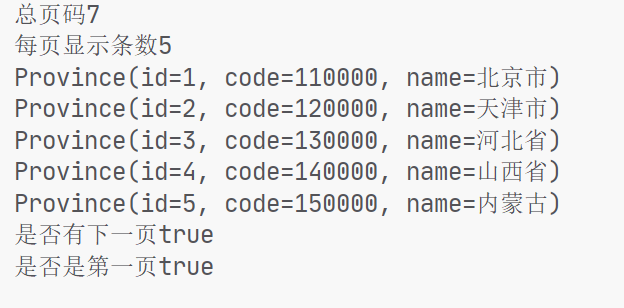
定义方法返回pageInfo对象,设置分页参数,pageInfo构造方法传入全部数据的集合即可
1
2
3
4
5
6
7
8
9
@Test public void selectAllProvincesByPage () PageInfo<Province> pageInfo = provinceService.selectAllProvincesByPage(1 , 5 ); System.out.println("总页码" + pageInfo.getPages()); System.out.println("每页显示条数" +pageInfo.getPageSize()); pageInfo.getList().forEach(System.out::println); System.out.println("是否有下一页" + pageInfo.isHasNextPage()); System.out.println("是否是第一页" + pageInfo.isIsFirstPage()); }
逆向工程 通用mapper
1 2 3 4 5 6 <dependency > <groupId > tk.mybatis</groupId > <artifactId > mapper</artifactId > <version > 4.1.5</version > <scope > compile</scope > </dependency >
1
2
3
4
5
6
7
8
9
10
11
@Data @Table (name = "gem_person" )public class Person @Id @GeneratedValue (strategy = GenerationType.IDENTITY) private Integer id; private String name; private String phone; private String qq; private String address; }
需要在实体类上使用table注解指定数据库,使用id注解标明主键,自增字段需要加GeneratedValue,类似于Hibernate
1 2 3 4 5 6 public interface PersonMapper extends Mapper <Person > }
1
2
3
4
5
6
7
8
9
10
11
12
13
14
15
16
17
18
19
20
21
22
23
24
25
26
27
28
29
30
31
32
33
34
35
36
37
@Test public void test () throws IOException InputStream in = Resources.getResourceAsStream("sqlMapConfig.xml" ); SqlSessionFactory sqlSessionFactory = new SqlSessionFactoryBuilder().build(in); SqlSession sqlSession = sqlSessionFactory.openSession(); MapperHelper mapperHelper = new MapperHelper(); mapperHelper.registerMapper(PersonMapper.class ) ; mapperHelper.processConfiguration(sqlSession.getConfiguration()); PersonMapper mapper = sqlSession.getMapper(PersonMapper.class ) ; Person person = new Person(); person.setName("张三" ); Example example = new Example(Person.class ) ; Example.Criteria criteria = example.createCriteria(); criteria.andLike("name" ,"%张%" ); Example.Criteria criteria1 = example.createCriteria(); criteria1.andEqualTo("name" ,"王五" ); example.or(criteria1); example.setOrderByClause("id desc" ); System.out.println(mapper.selectByExample(example)); }
在传统的Mybatis写法中,DAO接口需要与Mapper文件关联,即需要编写SQL来实现DAO接口中的方法。而在通用Mapper中,DAO只需要继承一个通用接口,即可拥有丰富的方法:
继承通用的Mapper,必须指定泛型